
You finish a hard half marathon, open the run, and the heart rate breakdown reads Zone 4: 53% (52:26) and Zone 5: 47% (46:16). The percentages add to 100. The minutes add to 98 — on a run that took nearly 110.
Underneath sits a fourth line: Missing Data: 11:05.
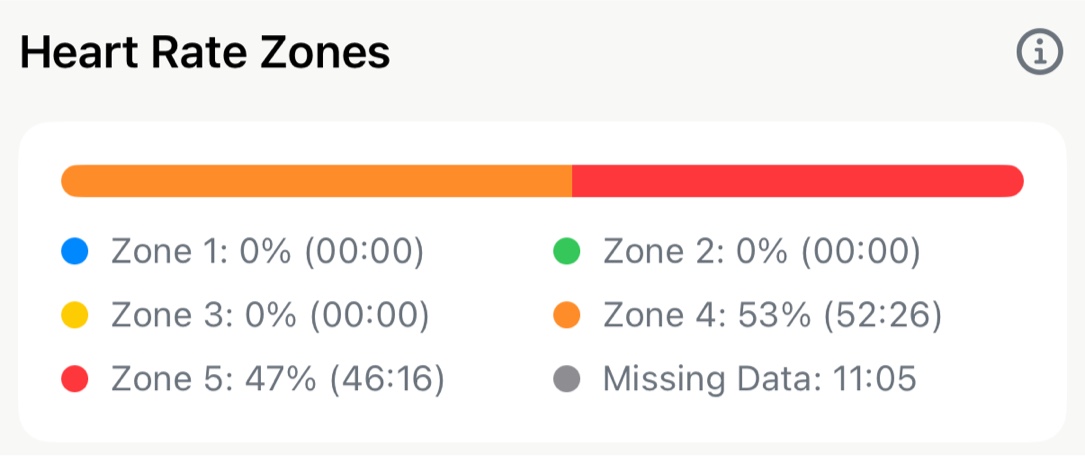
Nothing is broken. Your watch stopped reporting heart rate for eleven minutes of that race, and Apex Run is telling you so rather than quietly filling in the blanks.
What “Missing Data” actually counts#
Apex Run only assigns time to a zone when it has heart rate data to justify it. The percentages you see are shares of measured time. Missing Data is the remainder — the part of the run where the watch went quiet and no honest zone assignment was possible.
That’s why the percentages total 100% while the minutes don’t total your run duration. They’re answering different questions:
- The percentages ask: of the time we could measure, how was it distributed?
- The minutes ask: how much time could we actually measure?
Why heart rate data goes missing#
Optical sensors — the green LEDs on the back of a watch — infer heart rate from light reflected off blood flowing through your wrist. Several ordinary things interrupt that.
Strap fit#
The single largest cause. A watch that slides even slightly during arm swing loses its optical seal. Gaps that appear only during hard efforts are almost always a fit problem, not a sensor fault.
Cold weather#
Your body constricts peripheral blood vessels to protect core temperature. Less blood at the wrist means a weaker optical signal — which is why winter runs produce more gaps than summer ones at the same effort.
Intensity#
Arm swing, muscle contraction and sweat all degrade the optical reading, and all three increase with pace. This is the frustrating part: the sensor is least reliable exactly when zone data matters most — intervals, tempo efforts and races.
Wrist position and skin#
Worn on the wrist bone rather than a finger-width above it, the sensor sits on a moving, uneven surface. Wrist tattoos can absorb the green light the sensor depends on.
Chest straps aren’t immune#
Dry electrodes at the start of a run give erratic readings for the first kilometre or so until sweat improves conductivity — the classic “my heart rate says 190 while I’m jogging” opening. Straps also slip.
The 20-second rule#
Between any two consecutive heart rate readings, Apex Run measures the active gap between them:
- 20 seconds or less — the interval counts. The zone is assigned using the average of the two surrounding readings, not just the first one.
- More than 20 seconds — the interval is excluded and added to Missing Data.
The same test applies at the edges of a run. If your watch takes more than 20 seconds after you press start to produce its first reading, that opening stretch is excluded too.
Pausing your watch never creates a gap#
This trips people up. Paused time is subtracted before the gap is measured. A five-minute wait at a traffic light with the watch paused produces zero Missing Data, because the active gap is zero. Only time you were actually running without a heart rate reading counts against you.
Why not just fill in the blanks#
The tempting fix is interpolation: draw a straight line from the last reading before the gap to the first one after, and distribute the time along it. Most platforms do exactly this, silently.
Consider a four-minute gap that begins at 150 bpm and ends at 168 bpm. Interpolation would invent four minutes of smoothly rising heart rate — and file most of it in Zone 3.
But what actually happened in those four minutes?
- If you ran a hill, your real heart rate was well above that line — that was Zone 4 work, recorded as Zone 3.
- If you stopped to re-tie a shoe, it was well below — that was recovery, recorded as tempo.
- If you ran intervals, it oscillated across three zones and the straight line describes none of them.
The problem isn’t that interpolation is imprecise. It’s that it manufactures time-in-zone that then flows downstream — into your intensity distribution, your training load, your Zone 2 pace estimate, and your weekly 80/20 balance. A number invented at the sensor becomes a training decision three screens later, with nothing marking it as a guess.
Apex Run’s position is that an honest eleven-minute hole is more useful than eleven fabricated minutes. You can see the hole and judge accordingly. You cannot judge a number that looks exactly like real data.
How to read your own Missing Data#
- Under a minute or two — normal. Ignore it.
- Several minutes, concentrated in hard efforts — your sensor struggles at intensity. Treat that run’s zone split as directional rather than precise.
- A large fraction of the run — the zone breakdown isn’t usable for that session. The pace and split data are unaffected.
- Recurring across many runs — you have a fit or hardware problem worth solving, not a run-by-run annoyance.
Reducing gaps in your own data#
- Tighten the strap one notch above what feels natural, and wear the watch a finger-width above the wrist bone rather than on it.
- Tighten before hard efforts specifically. A fit that holds for easy running often fails during intervals.
- Cover the watch in cold weather — a sleeve pulled over it keeps the wrist warm enough to maintain perfusion.
- Wet chest strap electrodes before you start, if you use one. It removes the erratic first kilometre entirely.
- Use a chest strap for sessions where zone accuracy matters — threshold work, intervals, races. Wrist optical is fine for easy runs.
Seeing this in Apex Run#
- Open any run and scroll to the Heart Rate Zones card. Missing Data appears as its own grey entry whenever the run contains gaps.
- The pace and heart rate charts on the same screen break the line across a gap rather than connecting through it, so you can see where the data stops.
- Compare a few runs on the Run Insights tab. Recurring gaps in the same kind of session point at a fit problem you can fix.
Frequently Asked Questions#
Why does Apple Watch lose heart rate signal during hard runs?#
Vigorous arm swing, wrist movement, and sweat degrade the optical light seal between the sensor and skin, especially during high-intensity intervals.
Why doesn’t Apex Run interpolate missing heart rate gaps?#
Interpolation invents artificial heart rate data that pollutes your downstream training load, 80/20 intensity balance, and VO2 Max calculations with false numbers.
How can I stop heart rate dropouts on my running watch?#
Wear the watch a finger-width above the wrist bone, tighten the strap one notch before hard runs, and pull sleeves over the watch in cold weather to maintain blood flow.
Related Tools & Guides#
- Heart Rate Zones Explained — The 5-zone model, calculation methods, and cardiac drift.
- HRR vs %Max HR Comparison — Why two apps show different zones for the same run.
- Heart Rate Zones Calculator — Build your zones from Max HR, Karvonen (HRR), or LTHR.
- Training Load & ACWR — What downstream metrics inherit from your heart rate data.
- 80/20 Training Structure — Why your easy/hard balance depends on trustworthy zone data.
References & Further Reading#
- Gillinov, S., Etiwy, M., Wang, R., et al. (2017). “Variable Accuracy of Wearable Heart Rate Monitors during Aerobic Exercise.” Medicine & Science in Sports & Exercise, 49(8), 1697-1703. Compares wrist-based optical monitors against ECG across exercise modalities, finding accuracy degrades as intensity rises.
- Bent, B., Goldstein, B. A., Kibbe, W. A., & Dunn, J. P. (2020). “Investigating sources of inaccuracy in wearable optical heart rate sensors.” npj Digital Medicine, 3, 18. Examines how motion, skin tone and perfusion affect photoplethysmography accuracy in consumer wearables.