
Keep every race photo with the run it belongs to
The chip time saved itself. The medal photo is somewhere in your camera roll, in among the receipts and the screenshots. Trophy Room is where those two finally meet.
Your last race is already in Apex Run: the splits, the route, every beat of your heart rate. What’s missing is the part you’d actually show someone. Trophy Room puts the finish-line photo on the run itself, and collects every race you’ve ever run into one wall of cards.
Free, no limit on races, and ten photos on each one.
Where it is#
Open the Profile tab and scroll to Trophy Room, below your personal bests and badges. The card counts your races and shows the last few covers; tap it for the room itself.
What’s in the room#
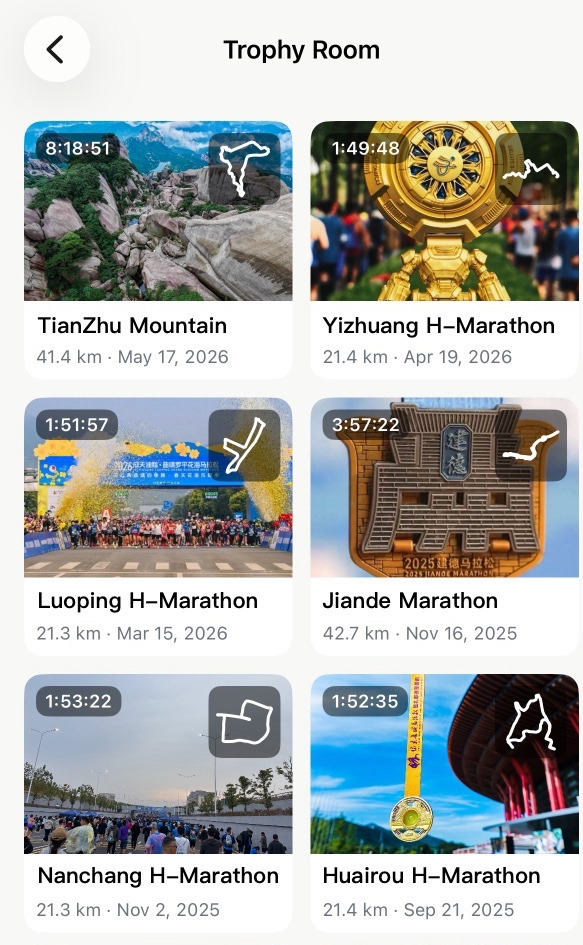
Every race you’ve labelled, newest first, two to a row. Each card carries your cover photo, the finishing time top left, the route shape top right, and the race’s name with its distance and date underneath. Tap one and it opens the run.
Nothing arrives here by itself#
This is the part to know before you go looking for your races: Apex Run never labels a run a Race. Every other type gets worked out for you — Easy, Long, Tempo, Interval, Recovery — but only you know whether that 10 km was a race or a good Tuesday. So the room stays empty until you say otherwise, however many start lines you’ve stood on.
It takes two taps. Open the race, tap the edit button top right, and set Run Type to Race.
Adding the photos#
The moment the type reads Race, a Trophy Photos section appears in that same sheet.
- Cover Photo — the one shot that stands for the race: the medal, the trophy, your bib. This is what you see on the card in the room and at the top of the run.
- Race Day Photos — up to nine more: the start pen in the cold, the crowd, the finish arch, whoever came to watch. A counter under the grid shows how many you’ve used, and the ✕ on a photo drops it.
Save, and the race has its own card in the room.
On the run itself#
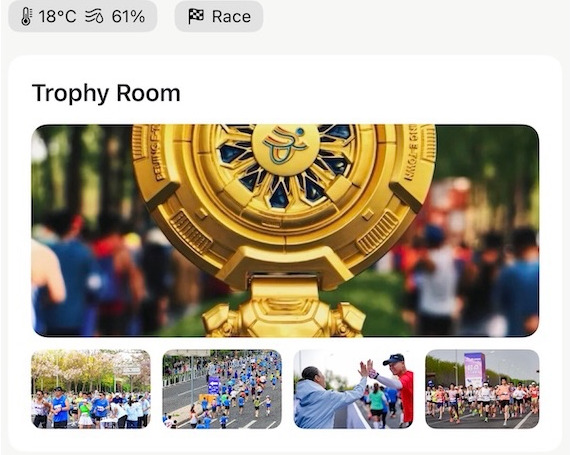
A race carries its Trophy Room panel on the run screen, just above the metric cards: the cover across the full width, then up to four thumbnails with a +N if there are more. Tap it and the photos open full screen, swipeable, with a dot for each one.
Before you’ve added any, the panel is a dashed box reading No trophy photos yet — and tapping that box opens the edit sheet for you, which is the quickest way in there is.
Worth knowing#
- Reimporting a race relabels it, so it disappears from the room. Setting the type back to Race brings the card and the photos back with it.
- The room lives on this phone. Race labels and trophy photos aren’t part of your Apple Health data, so another device with the same runs imported shows an empty room until you label the races there too.
- Apex Run keeps its own copy of each photo, which cuts both ways: clearing out your camera roll won’t empty a trophy, and a trophy isn’t a backup of the original.
- Your cover photo travels onto the share cards — two of the tall ones put it in a circle beside the route, so a race you share looks like a race.
- Merging a split race keeps its photos. A race your watch cut in two doesn’t lose the medal shot when you put it back together.
Why it was built this way: The photos were on my phone. The run was in the app.
Get the app
One race, one photo, tonight.
Trophy Room is free and there's no limit on races. Label your last one and add the medal shot — it takes a minute, and it's the run you'll open again in two years.
↓ Download Apex Run