
Know how far each pair has actually run
Two pairs in the rotation, both bought last spring, and no way of telling which one has the miles on it. Your runs already know. Tell Apex Run which pair you usually wear, and they'll keep telling it.
Add each pair once, say which one you usually wear, and Apex Run keeps the total. It’s the difference between these feel a bit flat and these have done 740 km.
Where it is#
Profile→Shoes Tracker . The card shows your default pair and how far it has run, so most days that’s all you need to see. Tap it for every pair.
There’s a shortcut worth knowing: the ⓘ beside Shoes in any run’s edit sheet opens the tracker too, so you can add a pair in the middle of editing a run.
Adding a pair#
Tap + top right. Nothing here is fussy:
- Name: whatever you call them out loud. Pegasus 41, the blue ones, trail shoes.
- Purchase Date: shown on the row as Added, and the date the offer below counts from.
- Color: ten shoe colours, or None. It’s what the pair looks like on every run, so two pairs in a rotation are easy to tell apart at a glance.
Already wrote the colour into the name? ASICS NOOSA TRI 16 RED, 飞影 蓝: Apex Run picks it up, so the pair shows in that colour without you choosing anything. If you’d like a shorter name, pick the colour first and then take it out of the name.
The list sorts by name, so if you run a rotation it’s worth naming with that in mind: Road — Pegasus, Road — Endorphin, Trail — Speedgoat keeps like with like, where Pegasus, Endorphin, Speedgoat scatters them.
Your default pair: the one new runs wear#
Your first pair becomes the default straight away, with a Default badge on its row. From then on, every new run arrives already wearing it. Nothing to pick after a run, and the total keeps itself.
To make a different pair the default, tap it and turn on Default for New Runs. Only one pair has it at a time, so turning it on moves the badge.
It only applies to runs from after you set it. Setting a default never piles your old runs onto a new pair. That’s what the offer below is for, and it asks first.
Running a rotation? Make the default the pair you wear most, and fix the others as they happen. That’s one tap, covered next.
Wore a different pair? One tap#
Open the run and tap the shoes on it, next to the weather and the run type. Pick the pair you actually wore, or None, and the distance moves across with it.
A run with no shoes shows Add shoes in the same place, and it works the same way.
The one offer you get, and it only comes once#
Save a new pair and, if you have runs since its purchase date with no shoes on them, Apex Run asks:
Tag past runs? Your runs since 8 Sep 2026 that don’t have shoes yet can all be tagged with “ASICS NOOSA TRI 16 RED”. You can change any of them later. Not Now · Tag 43 Runs
Take it and that pair starts with a real number instead of 0.00. It’s the difference between a tracker that’s useful tonight and one that’s useful in six months.
Two things make it safe to say yes to:
- The button counts first. You see how many runs it’s about to touch before you tap, so a purchase date you got wrong announces itself as an implausible number.
- It never takes a run off another pair. Only runs with no shoes are claimed, so adding a second pair can’t quietly move the first pair’s mileage across. If everything since that date is already tagged, you aren’t asked at all.
A rotation is the case to decline. If you alternate two pairs, no date can tell them apart, and the count will look far too big. Tap Not Now and tag as you go.
What a row tells you#
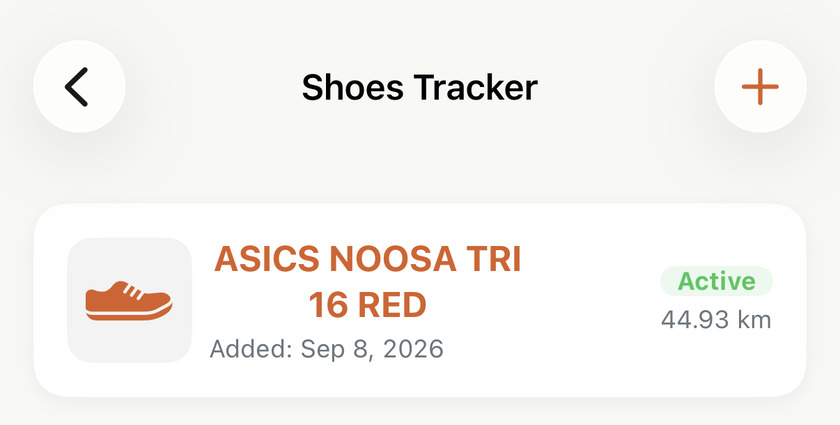
Each pair carries its colour, its name, a Default badge if it’s the one new runs wear, the date you added it, an Active or Retired badge, and the distance it has run.
That distance is the whole point of the screen, and it comes from one place: the runs that wore that pair. Your default pair looks after most of that, and a tap on a run covers the rest.
Move a run to a different pair and the distance moves with it. Untag it, or delete the run, and it comes off. And the past stays open: tagging an old run adds its distance whenever you do it, so a pair can always be brought up to its real total.
Retired: done with them, not deleted#
Set Status to Retired when a pair is finished. Three things change:
- The badge on its row, so next spring you can tell which of the three Pegasuses in your cupboard is the live one.
- It stops being the default, so new runs no longer arrive wearing it. Make another pair the default if you want that to carry on.
- It leaves the quick list you get by tapping the shoes on a run, so that list stays short.
It isn’t gone. It’s still in the Shoes picker in every run’s edit sheet, and anything tagged to it still counts. Its total stays exactly where it finished.
Nothing tells you when to replace them#
There’s no threshold and no warning at a magic number. The total is reported and the judgement is yours.
For what it’s worth, road shoes are usually quoted at 500–800 km, and that’s a range rather than a rule: heavier runners, rougher surfaces and thin racing shoes all land nearer the bottom of it. What the tracker gives you isn’t the answer, it’s the one thing you can’t get any other way: knowing where a pair actually is.
Worth knowing#
- Deleting a pair doesn’t touch your runs. The pair goes, and the runs that wore it simply stop naming shoes. Every kilometre they ran is still theirs.
- The delete has no undo, and the total is gone with the pair. You can add it again and re-tag the runs, though, and the total comes back.
- It’s all on this phone. Shoes aren’t part of your Apple Health data, so another device shows an empty list even with the same runs imported.
- A pair’s total updates itself. Tag a run now and the number is right the next time you look. There’s nothing to refresh.
Get the app
Add the pair you're wearing tonight.
Shoes Tracker is free and takes about twenty seconds to set up. Add the pair you run in most, and tonight's run is already counted on it.
↓ Download Apex Run