
Turn one race into your five training paces
Every plan you've ever read says 'run this at threshold pace' without telling you what your threshold pace is. This screen does — from a race you actually ran, not a chart for runners in general.
A pace chart tells you what a runner with your finish time typically holds in training. That’s a useful average and a bad personal answer, and the difference shows up every time a “tempo” feels like a race or an “easy” run turns into a slog. Apex Run works the paces out from one race you ran, and once they’re set, the Training Pace Zones table on every run reads against them.
Enter the race#
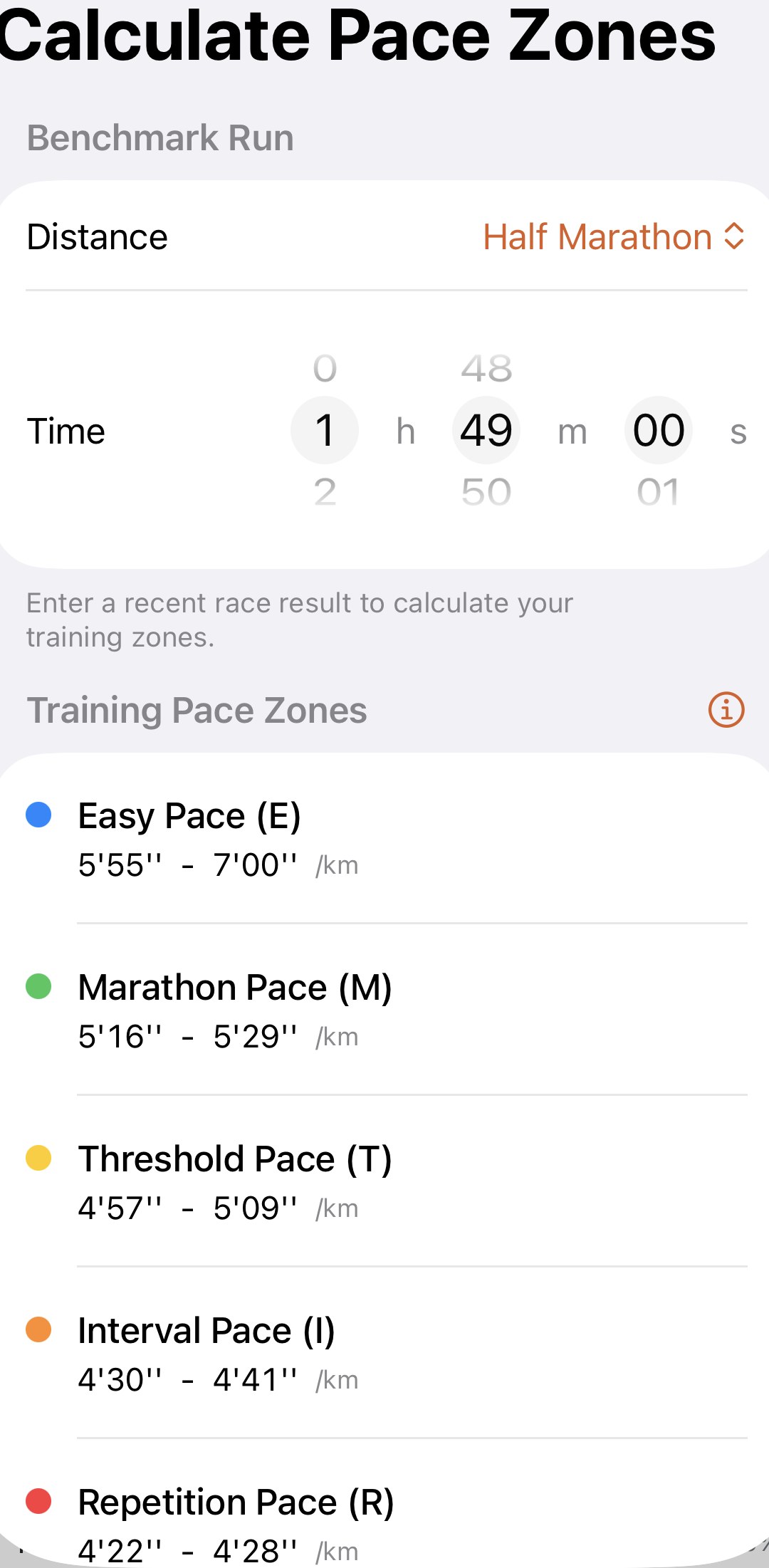
The screen is Profile→Settings→Calculate Pace Zones , and it’s also where Set Up and the ⓘ in the pace zone section of any run take you. Two controls:
- Distance — 5 km, 10 km, Half Marathon or Marathon. Pick the one you raced.
- Time — hours, minutes and seconds on a wheel. Your finish time, as the clock had it.
The five zones under Training Pace Zones update as you scroll, so you can watch a minute off your time nudge every pace. There’s no Save button. What’s on the screen when you leave is what’s set, and every run you’ve ever recorded re-reads against it the moment you’re back on the run.
Which race to enter#
The paces are only as honest as the result behind them, so the choice matters more than the screen does.
- Recent beats fast. A race from the last two or three months describes the runner you are now. A PB from three years ago makes every current run look slow and files your tempos under Marathon pace.
- A race, not a good training day. The zones assume you emptied the tank. A brisk long run entered as a benchmark gives you paces you can hold too easily, and the runs that should read as Threshold will read as Interval.
- Prefer the distance you’re training for. The other paces are projected from the one you enter, and the projection assumes your endurance and speed are in normal proportion. A fast 5K from a runner who fades over long distances projects a marathon pace they can’t hold; a marathon time from a runner with no speed projects Interval and Repetition paces that are too slow to train speed. If you have a half marathon and you’re training for a marathon, use the half. If your only recent result is a 5K, it’s still far better than a chart.
- A flat, normal-weather race. A hilly course or a hot day gives a slower time than you’re worth, and every pace inherits it.
If none of your recent races fit, run a hard 5 km on a flat route, treat it as one, and come back when you’ve raced for real.
What the five paces are#
Each zone is a narrow band around a pace you could race a certain distance at. That’s what makes them usable as targets: they’re specific, and they line up with how most plans describe sessions.
| Pace | Roughly | What it’s for |
|---|---|---|
| Easy (E) | Comfortably slower than your marathon pace, with room in it | Building mileage and your aerobic base — most of your week |
| Marathon (M) | The marathon pace your race predicts | Tempo runs and race-specific long runs |
| Threshold (T) | About the pace you could race for an hour | Clearing lactate faster; holding a hard pace longer |
| Interval (I) | About your 3 km race pace | VO₂ max — raising your ceiling |
| Repetition (R) | About your mile pace | Running economy and leg speed |
The four faster zones are deliberately tight. That’s why a run has grey rows between them: a pace that isn’t Threshold and isn’t Marathon is in the gap, and the run page explains how to read those. Easy is the exception. It’s wide on purpose, because easy running has a range and the top of it is still easy.
Tap the ⓘ beside Training Pace Zones for a note on what each zone trains and why spending your time in the zones, rather than between them, gets more out of the same mileage. The same sheet describes each gap and what to do about landing there — for everyone, Pro or not.
When to come back#
- After a breakthrough race. Enter it the same day. Every run re-reads instantly, so your next tempo is judged against the runner who just raced.
- After a long break. Coming back from injury or a lay-off with last year’s benchmark makes every run read as slow, which is discouraging and wrong. Race something short, enter that, and let the paces climb back with you.
- When the table looks wrong on every run. Easy runs landing in Marathon pace, or tempos landing Below Easy, is a benchmark problem, not a running problem. Runs are only ever compared against what’s on this screen.
Worth knowing#
- Free. The set-up, the five paces and the table on every run. Pro’s part is naming the grey rows on a run, and nothing here changes with it.
- Miles or kilometres follow your distance setting. The ranges on this screen and on every run show the unit you’ve chosen.
- The sanity check is Easy pace. The slow end of it should be a pace you could hold a conversation at. If it isn’t, the benchmark is too fast for the runner you are today — pick something more recent.
- One benchmark, not one per distance. The screen keeps a single race and projects everything from it, so entering a 10K replaces the half you had before. That’s fine: use the most recent honest result, whatever its distance.
The metric behind it: Jack Daniels' running formula and VDOT explained
Try it in your browser: VDOT and training pace calculator
Get the app
Your paces, from your race.
One recent result and every run you've recorded shows its time at Easy, Marathon, Threshold, Interval and Repetition pace. Setting it up is free, takes a minute, and re-reads your whole history on the spot.
↓ Download Apex Run