
Set heart rate zones that match your effort
If your easy runs keep reading as moderate, the problem is usually the zones, not the running. Apex Run gives you four ways to generate them and lets you nudge any boundary one beat at a time — and the change reaches every run you've ever done.
Zones from a stock formula are a guess about a population, and you’re one person. The usual symptom is that every easy run reads as Zone 3, which makes your whole week look harder than it was — and quietly ruins any 80/20 calculation built on top of it.
Where to start: Max HR#
Zones are derived from your maximum heart rate, so that number comes first.
Apex Run reads your date of birth from Apple Health and estimates 220 − age. That’s a reasonable default and a poor personal answer — real maximums vary by 10–20 bpm at the same age. If you’ve ever finished a hard 5K or a hill session and seen a number your watch has never beaten, that’s much closer to your true max than any formula.
Set it in Profile→Settings→Max Heart Rate — switch the method from Auto-calculate to Manual and type the figure in.
Four ways to generate them#
Zone settings live at Profile→Settings→Customize Zones , and you can also reach them from the heart rate zone section on any run. Calculate Method at the top offers four:
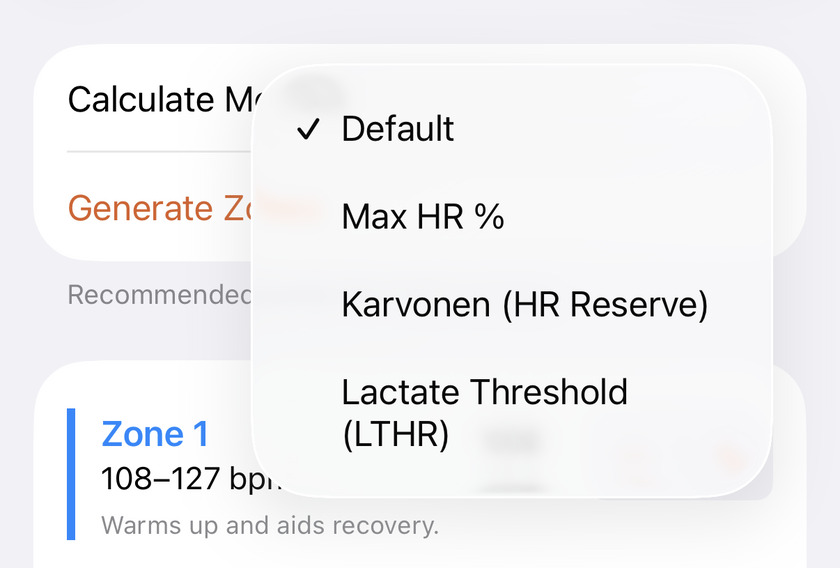
- Default — Apex Run’s recommended split, and what you already have if you’ve never touched this screen. Fine for most runners.
- Max HR % — straight percentages of your maximum, the textbook model and what most watches do. Its zones sit lower than the default’s, so the same run reads a little harder.
- Karvonen (HR Reserve) — percentages of the gap between resting and maximum heart rate. It asks for your resting HR and fills it in from Apple Health when there’s data, so there’s usually nothing to type. Generally puts easy running in a more believable place, especially if you’re well trained.
- Lactate Threshold (LTHR) — anchored to the heart rate you can hold for roughly an hour. The most accurate of the four if you know that number, and the least useful if you’re guessing it. Apex Run starts you at an estimate; the button stays greyed out until you’ve entered something plausible.
Tap Generate Zones and the boundaries fill in. Picking a method changes nothing on its own, so you can generate from one, look, then generate from another.
Then move what doesn’t match#
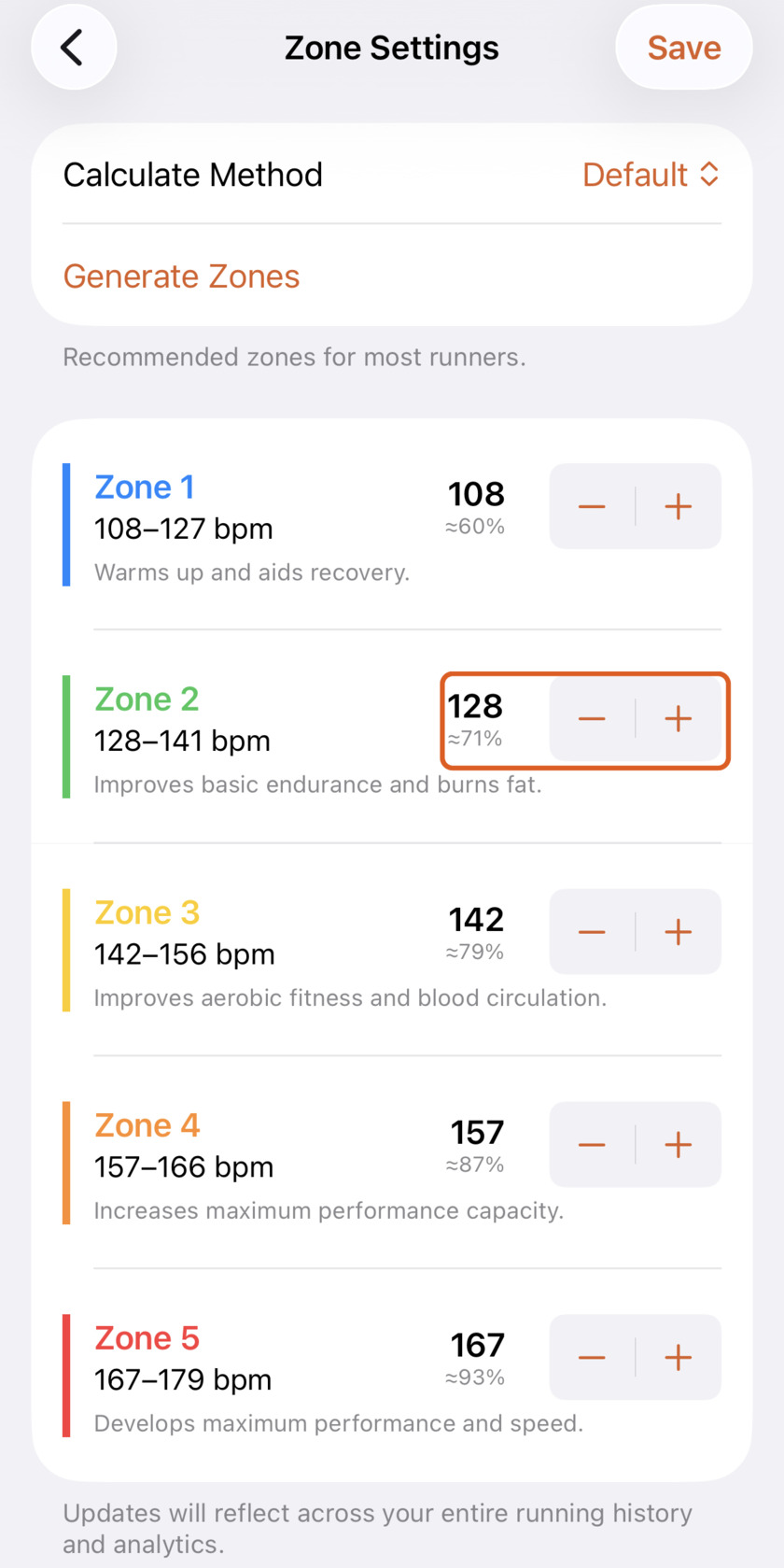
No generator is going to be right about you on the first try, so every boundary is yours to adjust:
- The big number is where the zone starts, in BPM, with its share of your Max HR underneath. The row’s range runs up to wherever the next zone begins.
- − and + move that boundary one beat per tap. Hold to travel further.
- You can’t tangle them up. A boundary stops before it reaches its neighbour, so Zone 3 can never end up under Zone 2.
Nothing is saved until you tap Save, top right — including anything you generated. Back out without saving and your old zones are still there, which is what makes trying a method risk-free.
The method itself isn’t remembered, either: Calculate Method reads Default every time you open the screen, whatever you last generated from. It’s a button you reach for, not a setting. Your boundaries are the thing that’s stored.
The five zones and what each one is for:
| Zone | What it does |
|---|---|
| Zone 1 | Warms up and aids recovery |
| Zone 2 | Improves basic endurance and burns fat |
| Zone 3 | Improves aerobic fitness and blood circulation |
| Zone 4 | Increases maximum performance capacity |
| Zone 5 | Develops maximum performance and speed |
If an experiment goes badly, pick Default, tap Generate Zones and you’re back to the recommended split for your current Max HR.
What changes when you save#
Your runs show the new zones straight away — the one from this morning and the one from two years ago alike. Nothing to wait for.
Getting the numbers honestly#
- Don’t use a lab-free LTHR guess. If you’re estimating lactate threshold, you’re just doing Max HR % with extra steps. Use Default or Karvonen until you’ve actually done a threshold test.
- Let Karvonen use Health’s resting HR. The number it prefills is your overnight resting rate as Apple Health has tracked it, which is the one Karvonen wants — not a figure you took sitting at your desk. Only override it if you know Health has it wrong.
- Sanity-check against feel. Zone 2 should be a pace you could hold while holding a conversation. If yours isn’t, move the boundary until it is; the model works for you, not the reverse.
The metric behind it: Heart rate zones explained
Try it in your browser: Heart Rate Zones Calculator
Get the app
Make your easy runs read as easy.
Set your zones once and every run you've ever done shows the right numbers. Custom heart rate zones are free in Apex Run — no subscription.
↓ Download Apex Run