
Read your running form on any runFree + Pro
Fitness takes months to move, but form can change on your next run. Apex Run's Running Form tab separates biomechanics from pace, giving you full flight trajectory arcs, gait cycle timing bars, and synchronized time-series charts across every second of your run.
Pace and heart rate tell you how hard you worked; running form tells you how your body handled the load. Every running dynamics metric is the part of your running economy you can improve without adding a single kilometre to your week.
In Apex Run, running form has its own dedicated tab so you can study your biomechanics without scrolling through miles of splits and heart rate zones.
Where to find it#
Open any run recorded with an Apple Watch. Right beneath the run header, tap the Running Form tab on the segmented control:
[ 📈 Performance | 🏃 Running Form ]
What you’re looking at#
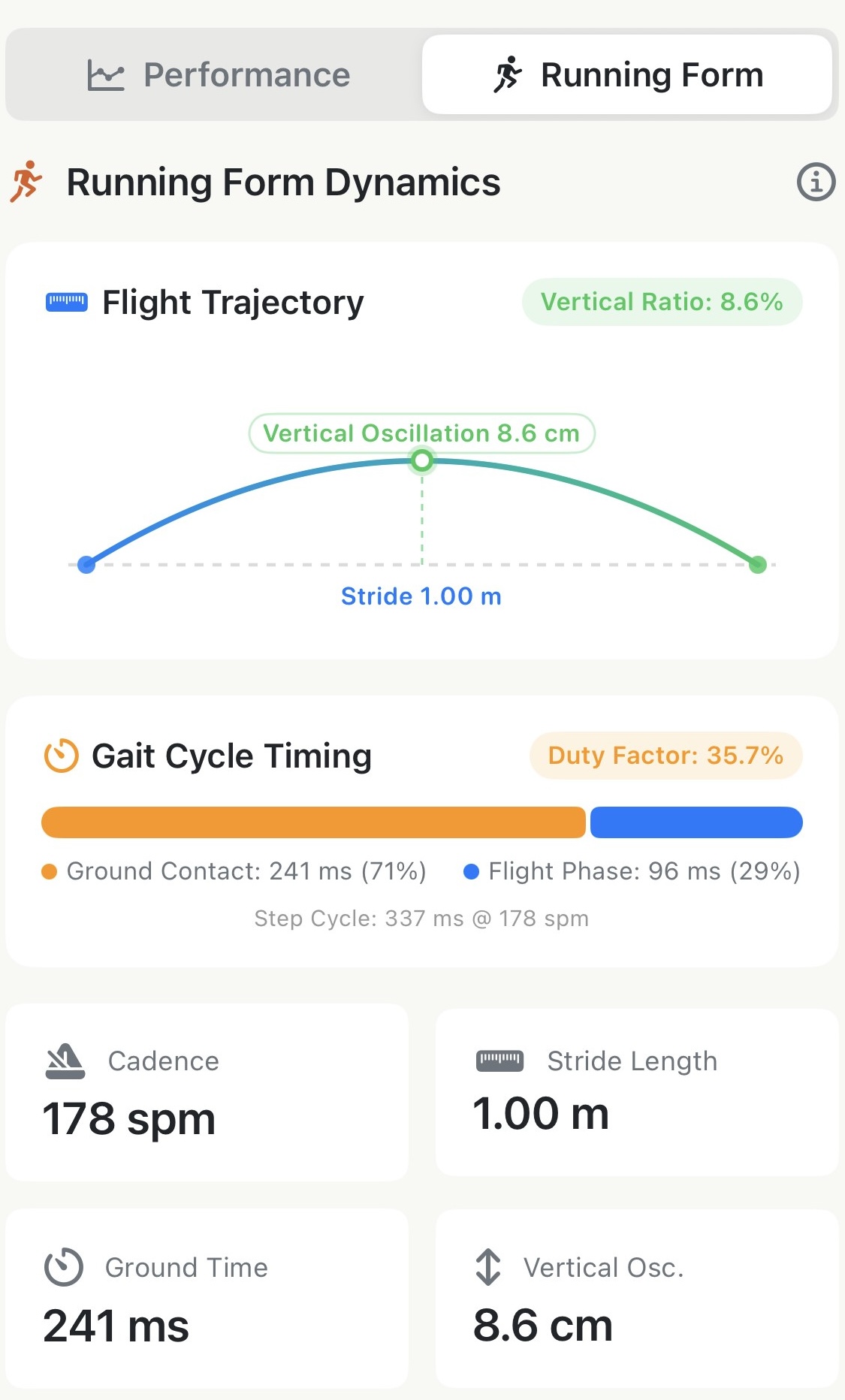
At the top of the tab, the Running Form Dynamics card translates raw numbers into visual biomechanics:
1. Flight Trajectory#
A parabolic arc modeling how your body travels through the air on every stride:
- Stride Length — the horizontal baseline (e.g.
1.00 m). - Vertical Oscillation — the apex of the arc (e.g.
8.6 cm), measuring how much your centre of mass bounced upward. - Vertical Ratio (Pro) — the green badge in the corner (e.g.
8.6%). It divides bounce by stride length to answer the real question: what percentage of your energy went upward instead of forward?
2. Gait Cycle Timing#
A segmented progress bar mapping one single step cycle:
- Ground Contact Time (orange bar) — how long your foot stayed on the ground (e.g.
241 ms,71%of the step). - Flight Phase (blue bar) — how long both feet were in the air (e.g.
96 ms,29%of the step). - Step Cycle — total duration of the step at your cadence (e.g.
337 ms @ 178 spm). - Duty Factor (Pro) — the badge in the corner (e.g.
35.7%). It measures the proportion of a full two-step gait cycle spent on the ground. Lower numbers mean a springier, more elastic stride.
3. Four Core Metric Cards#
- Cadence — steps per minute (both feet).
- Stride Length — ground covered per step in metres.
- Ground Time — foot strike contact duration in milliseconds.
- Vertical Osc. — torso bounce per step in centimetres.
Synchronized time-series charts#
Scroll down past the hero card to see four full time-series charts: Cadence, Stride Length, Ground Time, and Vertical Oscillation.
Apex Run fetches every raw sample from HealthKit rather than just an end-of-run summary, letting you see how your form evolved from the first kilometre to the last.
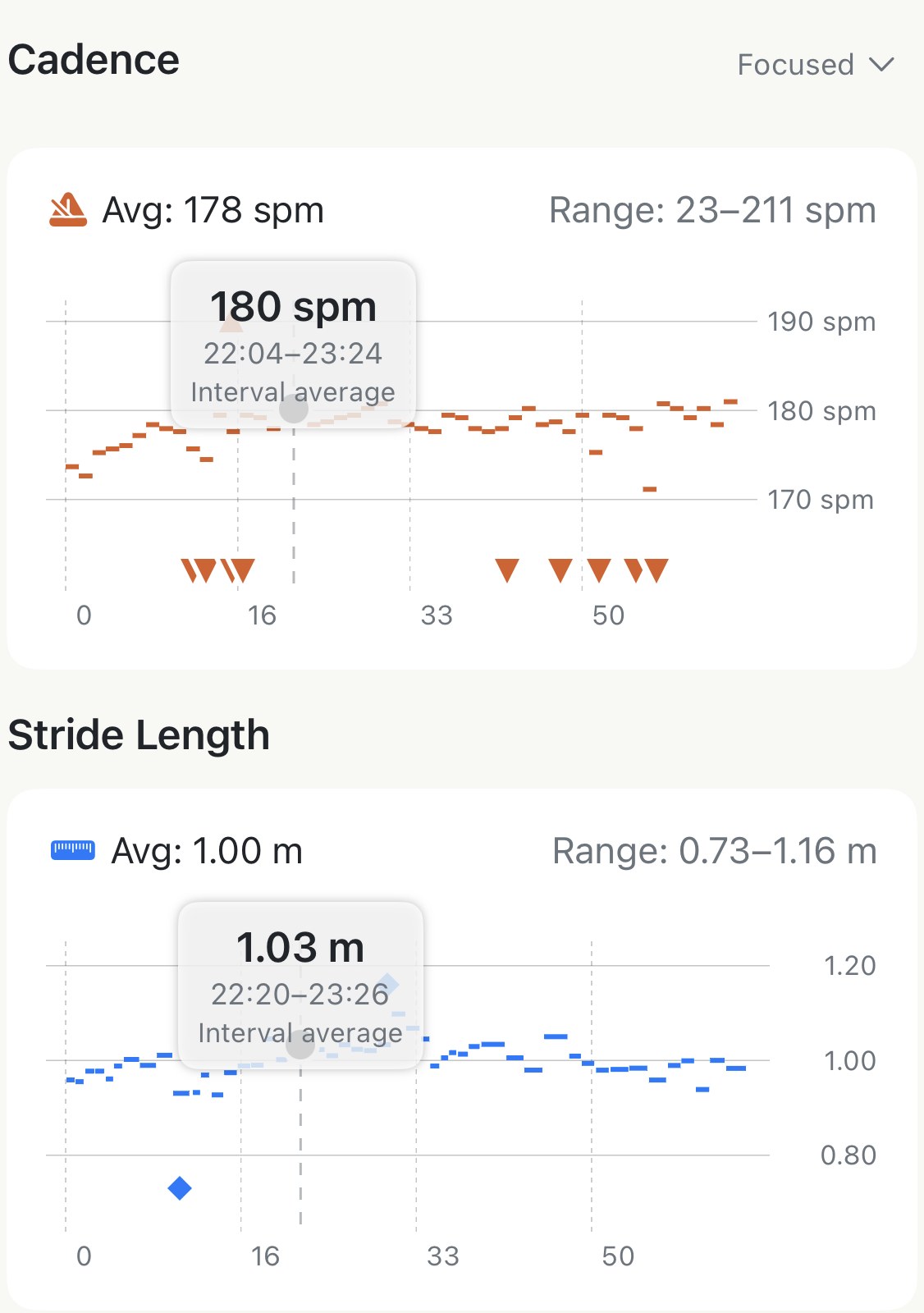
- Linked crosshair scrubbing: Touch and hold anywhere on any chart. A vertical dashed cursor sweeps across all four charts simultaneously. The tooltip displays the exact interval average at that moment (e.g.
180 spm,1.03 m,235 ms), while the top Flight Trajectory and Gait Cycle cards update in real time. - Focus vs. Full range: Tap the dropdown (
Focused ˅/Full ˅) in the top-right corner of each chart card. Focused zooms in on your working range to reveal subtle shifts and drifts; Full drops the y-axis to zero for absolute scale.
Running form in every split#
Form often deteriorates late in a run, but a whole-run average hides where the breakdown happened.
Tap any row in your splits table to open Split Detail, then toggle to the Running Form tab inside the split. You get:
- A split-specific Flight Trajectory arc and Gait Cycle Timing bar.
- Average ground contact time, vertical oscillation, and stride length calculated strictly for that kilometre or mile.
- An instant way to compare your form on an uphill split versus a flat closing sprint.
Free vs. Pro#
Our philosophy is simple: your raw data belongs to you.
- Free: All measured sensor metrics (Cadence, Stride Length, Ground Contact Time, Vertical Oscillation), their whole-run and split averages, and all four interactive time-series charts with linked scrubbing.
- Pro: The two advanced biomechanical efficiency ratios — Vertical Ratio and Duty Factor.
When a metric is missing#
- Treadmill runs — cadence and stride length are recorded, but Apple Watch does not measure vertical bounce or ground contact time indoors.
- Older Apple Watch models — ground contact time and vertical oscillation require an Apple Watch Series 6, SE (2nd gen), Ultra, or newer running watchOS 9+.
- Phone-only runs — runs recorded on iPhone without a watch do not have running dynamics data.
- Two Pro badges missing — Vertical Ratio requires vertical oscillation, and Duty Factor requires ground contact time. If the raw sensor measurement is absent, the derived ratio cannot be calculated.
The metric behind it: Running form metrics explained
Why it was built this way: Running form, beyond single averages
Get the app
See where the effort went.
Cadence, stride, ground time and bounce charts on every watch run, free. Pro adds the two biomechanical ratios that show how much energy was lost.
↓ Download Apex Run