
Read the cards at the top of every run
You open a run and there are twelve numbers before you've scrolled. Most explain themselves. Two depend on something you set, one is not the number your Fitness app shows, and a few only appear when your watch recorded them — which is what this page is for.
Tap any run and the top of the screen is a grid of cards: the whole session in one glance, before the map, the splits and the charts. Most of them say exactly what they mean. A few reward knowing where the number comes from — not because the maths is interesting, but because it changes what you do when one looks wrong.
Above the cards#
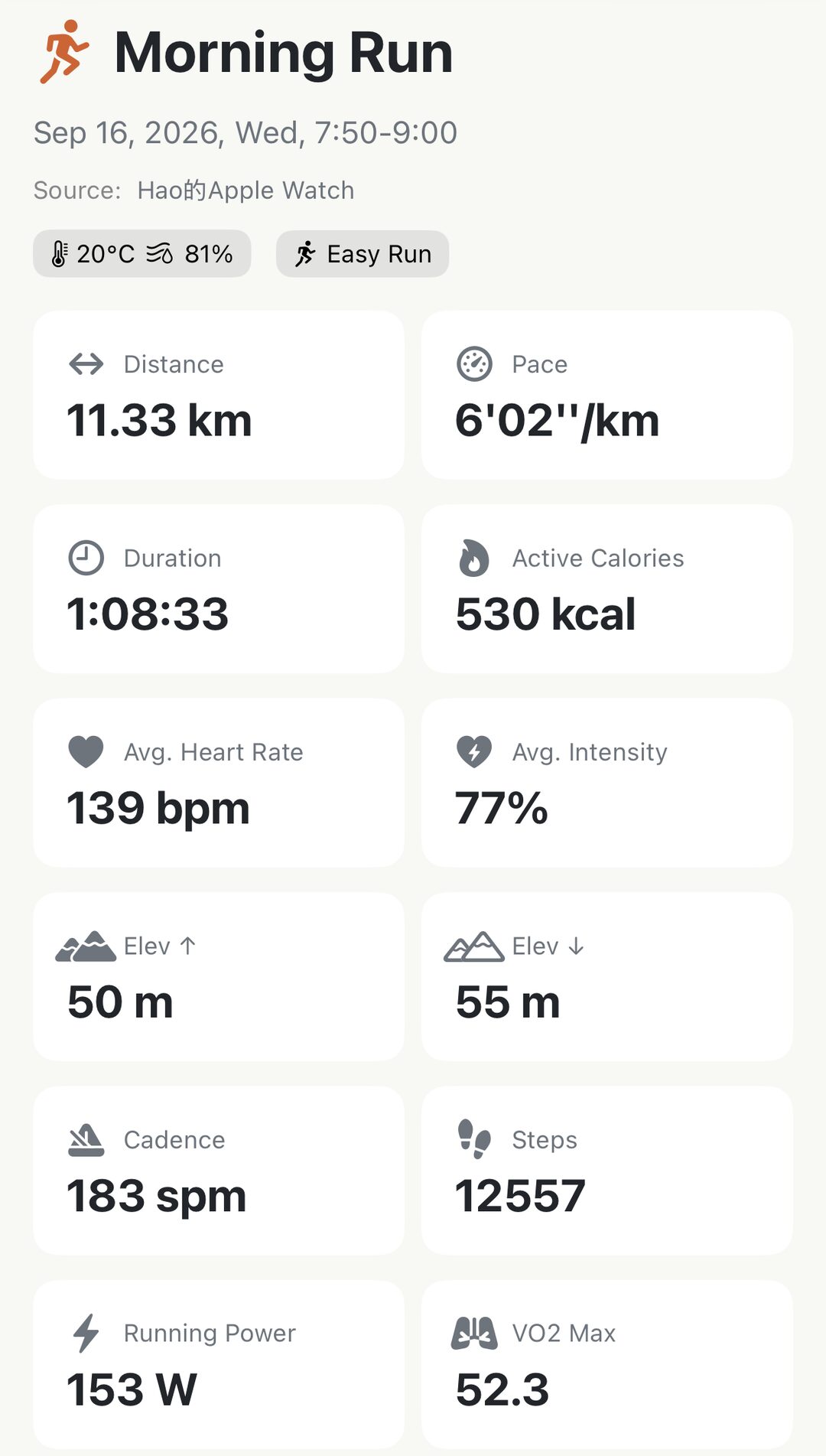
Three lines sit above the grid, and each one is worth a glance:
- The name and the date. Apex Run’s own name for the run, or the one you gave it — see names, notes and shoes.
- Source — which device recorded it. Watch, phone, or Merged and FIT File for the two kinds of run that live only in this app. That line is what tells you whether Reimport has anything to fetch.
- The chips. Weather at the start of the run, the run type, the shoes it’s tagged to, and a star if it’s a favourite. A chip that isn’t there simply wasn’t recorded or wasn’t set.
The twelve cards#
In the order they appear:
- Distance — in kilometres or miles, whichever you chose in Settings. So is every other distance on the page; elevation stays in metres either way.
- Pace — your average for the whole run, start to finish. Not the fastest you touched; the splits are where that lives.
- Duration — the time your watch counted as running. If you paused the watch at a light, that wait is in neither this card nor the pace.
- Active Calories — the energy the run itself cost. It is lower than the total your Fitness app shows for the same workout, because that total also counts what you’d have burned sitting still. Both are right; they answer different questions.
- Avg. Heart Rate — across the run, in beats per minute.
- Avg. Intensity — that same average heart rate, as a share of your Max HR. This is the one card that depends on a setting: an 80% here and a 70% on your watch for the same run means the two disagree about your Max HR, not about your heart. If your intensities all look high, Max HR is what to check — Settings → Heart Rate Zones.
- Elev ↑ — total climb over the run.
- Elev ↓ — total descent. On a loop the two come out close; a big gap between them tells you the run was point to point, and which way it went.
- Cadence — average steps per minute.
- Steps — the total for the run.
- Running Power — average watts, on a watch recent enough to measure it. Power holds steady where pace doesn’t, which is what makes it a fairer read of effort on a hilly run.
- VO₂ Max — Apple’s estimate of your aerobic fitness, taken from this run. Think of it as a slow-moving number: one run’s reading matters far less than whether it drifts up over months.
When a card is missing#
The grid only shows what the run actually has, so it shrinks to fit the data:
- No watch on your wrist — no heart rate, so no Avg. Heart Rate and no Avg. Intensity. Everything else is still there.
- Treadmill — no climb, no descent and no VO₂ max, because all three need a route and the open air.
- An older watch — no Running Power.
- A short run, or one where the watch struggled for a signal — VO₂ max is the card most likely to be absent. Apple only produces a reading when it has enough to go on, and it decides that, not Apex Run.
Worth knowing#
- The cards don’t open anything. They’re the headline; the detail is in the sections underneath, and each one has its own page in this group — splits, heart rate, zones, elevation, form.
- Everything here is free, on every run, however old. Pro adds sections below the grid; it never hides a card.
- Two averages, two answers. Pace is the average of the whole run; the Zone 2 Avg Pace further down is the average of only the easy part of it. Expect them to differ, and by more on a run with hard efforts in it.
- The weather chip is where the run started, not an average. A run that began at 25 °C and ended in rain still says 25 °C.
The metric behind it: Performance metrics explained
Get the app
Every card, on every run you've ever recorded.
The whole grid is free, on runs from last night and runs from three years ago. Pro adds the sections underneath it — not the cards.
↓ Download Apex Run