
Watch the run again, from above or from behindPro
You know how the run went. Replay shows you where it went that way — the climb that slowed you is a place on the map, not a dip on a chart.
A run’s map is a shape. Replay is the same shape with time in it: the route draws itself in as a runner icon moves along it, a pin drops at every kilometre, and a readout at the top says how far in you are. It’s a half-minute film of the run, and it’s a surprisingly good way to remember one.
Where it is#
Open the run, tap ⋯, then Route Replay. It’s also the Play button down the right-hand edge of the full-screen map. Only runs with a route have it; a treadmill run has nothing to replay.
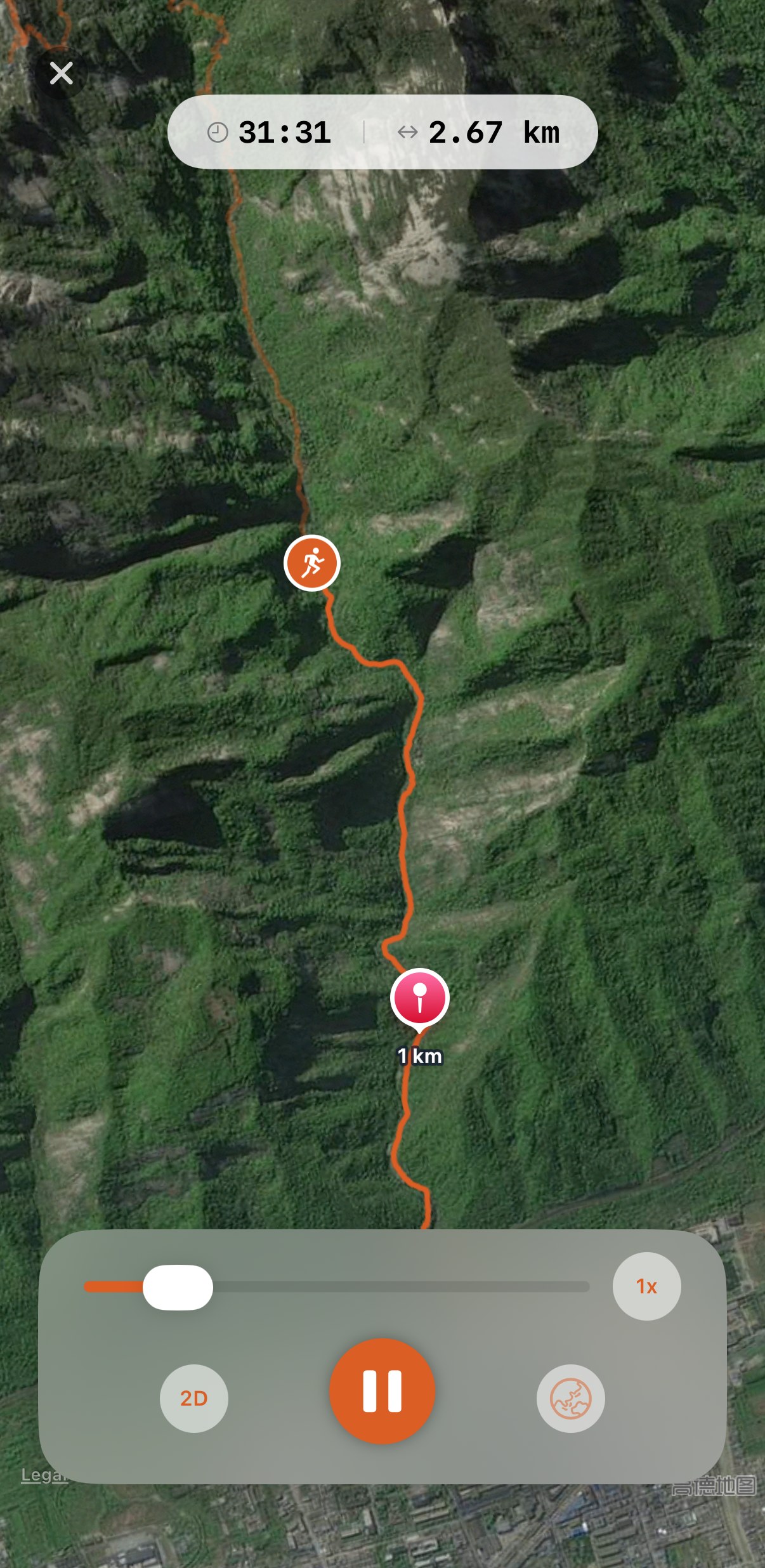
What you’re watching#
- The readout at the top shows time and distance at this moment. Tap it and it opens to show pace, heart rate and elevation at the same moment, so you can watch the heart rate climb with the hill.
- The route draws itself in bright orange over a faint copy of the whole route, so you always see what’s still to come.
- A pin drops at every kilometre and stays a few seconds. Kilometres even if your units are miles.
- The controls at the bottom: a scrubber you can drag to any point, a speed button, a 2D/3D button, play and pause, and a map-style button.
2D and 3D#
2D is the view from above. It opens on the whole route, and when you press play it dives in to the runner and follows along, keeping up rather than pinning the icon to the centre. This is the one for seeing the shape: where the route doubles back, where the loops are.
3D puts the camera behind and above the runner, looking the way the route goes next, tilted so hills are hills: the map has real terrain, and a ridge stands up as a ridge. The view turns to follow the route ahead rather than every bend of the trail, so a zigzag climb reads as a climb, not a spin. This is the one for a trail or a mountain, where the terrain is the story, and it’s best on satellite, where the mountain looks like a mountain.
The button shows the mode you’re in. Switch at any point, even mid-play. Going into 3D, changing the map style or jumping with the scrubber lifts the camera straight up for a moment while the terrain loads underneath, then dives back in behind the runner.
Speed and the map#
At 1x a run takes about half a minute in 2D, whatever its length, so a marathon flies. 3D takes two to three times longer, so the terrain has time to draw and the camera isn’t whipping round corners. 2x and 3x shorten either.
The map-style button cycles standard, hybrid and satellite. Replay opens on standard each time; one tap gets you to satellite.
Worth knowing#
- Stops are skipped. A wait at a crossing is a blink, not a pause, so the film is all running.
- You can look around while it plays. Drag or pinch the map and the camera stops following while your finger is down, then picks the runner back up a moment after you let go.
- Drag the scrubber to jump. Straight to the finish, back to the hill, wherever. In 3D the camera stays up while your finger is on the scrubber and dives back in when you let go. Once it reaches the end, play starts it again from the beginning.
- It’s Pro, the one Pro thing on the map screen. Colouring the route by pace or heart rate, the chart and all three map styles are free and on their own page.
Get the app
Half a minute, and the whole run goes by.
Route Replay is part of Pro, with a 14-day trial. Every run with a route already in Apple Health can be played back from the day you install.
↓ Download Apex Run