
Take a run out of your history for good
There is a run in your history you would rather wasn't. Getting rid of it takes two taps — knowing whether it stays gone takes ten seconds of reading.
Sometimes a run just doesn’t belong in your history — and while it’s there, it’s quietly bending every average you look at. Clearing it takes two taps.
What’s worth reading is what happens afterwards — especially whether Apple Health has a copy of that workout.
Where it is#
Two ways in, same result:
- From a list: press and hold any run, in list or grid, and tap Delete.
- From the run itself: open it, tap ⋯ in the top corner, then Delete Run.
Either way you get one confirmation, and that’s the last you’re asked.
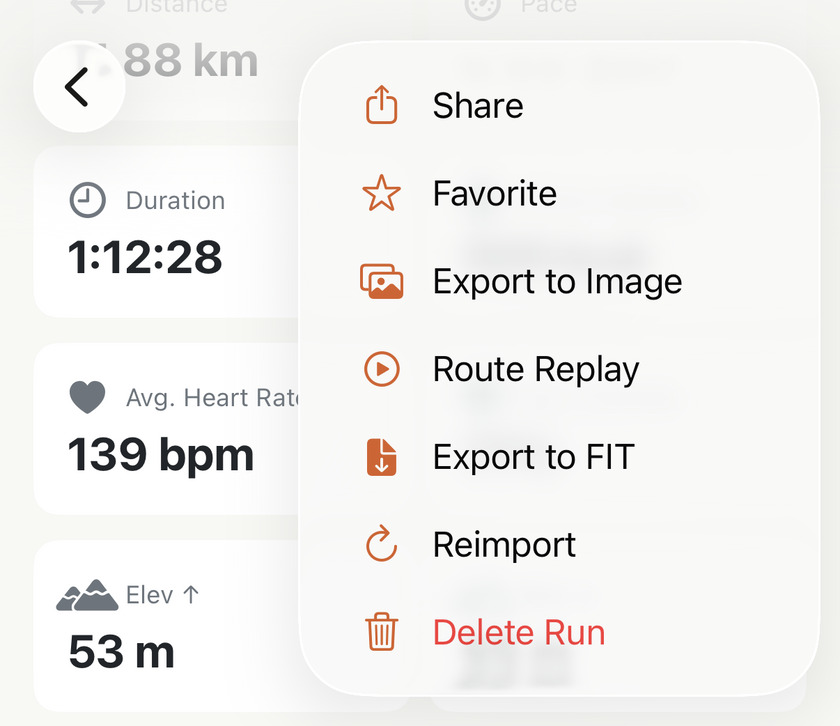
What goes with it#
The run leaves every list and every total it was in: the week, the month, your lifetime stats, the heatmap, the category cards. If it held one of your records, the record moves to your next best run — nothing is left standing on a run that isn’t there. If it was tagged to a pair of shoes, their mileage drops by that run’s distance.
And everything you typed on that run goes with it — the name, the notes, the favourite star, the type you set by hand, any race photos in it. Those never existed anywhere but this phone, so nothing can fetch them back.
That’s what the confirmation means by cannot be undone. Data still in Health can be read again. Your own work can’t.
It stays gone#
Deleting a run here doesn’t touch Apple Health. A workout your watch saved there stays there, as does any copy you created with Save to Health. That optional Pro action saves a single FIT running workout; later local edits or deletions never change its Health copy.
Which raises the obvious worry: if Health still has it, does it just come back on the next sync? No. A run you deleted stays deleted, however many runs you record afterwards. You only have to do this once.
Changing your mind#
Deleted the wrong one? Profile→Settings→Data→Sync All Data can read a workout still in Apple Health again, using the data Health holds. A FIT run’s saved Health copy is not a full backup: it can’t restore local edits or FIT fields that weren’t saved there.
It brings back every deleted run still in Apple Health, not just the one you regret. There’s no per-run undo: Sync All Data is all-or-nothing by design. If you’ve cleared out a dozen junk imports over the months and now want one of them back, you’ll get the dozen back with it — and you’ll have to delete the eleven again.
So it’s the right tool for “I’ve just deleted the wrong run”, and a blunt one for anything older than about five minutes.
The deletes that are final#
A run that isn’t in Apple Health can’t be fetched back from it. Check these two cases before deleting:
- A merged run — the stitched-together result lives only in this app. Deleting it doesn’t lose the running, though: its two halves are still in Health, and they stop being spoken for the moment the merged run goes, so Sync All Data brings them both back and you can merge them again.
- A run imported from a .fit file — importing alone doesn’t put it in Health. Keep the original file if you may want to import it again. If you separately used Save to Health, that copy survives the local deletion, but it doesn’t preserve every FIT field or your local edits.
The Source line tells you where the run came from, not whether it has a backup. A merged run or the original FIT import still has no Reimport in its menu. Saving a FIT run to Health doesn’t change that; check its save status rather than assuming a Health copy exists.
Deleting it in Apple Health instead#
The one-sidedness runs the other way too: remove a workout in Apple’s Health or Fitness app and Apex Run keeps its copy. The run stays in your history, with everything it had. Even a Sync All Data won’t take it away — there’s nothing left in Health for it to compare against.
Which gives you the one recipe worth remembering: delete it in both places and it’s really gone. Delete it in only one, and the other still has it.
Worth knowing#
- The confirmation is the only guard. There’s no trash can and no undo button — press and hold, tap Delete, tap Delete again, and the run is out.
- A duplicate is usually worth deleting rather than fixing. Two copies of one session double it in every total you look at, which is a bigger distortion than one missing route.
- If the run is right but its data looks thin, don’t delete it — when available, Reimport fetches that one run again and keeps your name, notes and shoes. Deleting and waiting for a re-sync throws those away for no reason.
Get the app
Clear the runs you don't want counted.
Deleting here leaves any Apple Health copy alone. Sync All Data can read that copy again, but it won't restore local edits or data that was never saved to Health.
↓ Download Apex Run