
Find your fastest 5K inside any run
Fourteen easy kilometres with a hard middle, and somewhere in there was the fastest 5 km you've run all month. Your watch's summary has no idea — it gives you one average pace for the lot. Best Effort goes looking, on every run, and tells you when a stretch was one of your best ever.
A split is a fixed slice of the run: kilometre three is kilometre three, whether you were flying or walking a hill. A best effort is different. It’s the fastest stretch of a given length anywhere in the run — starting 2.3 km in if that’s where you got going, straddling three splits if that’s where the speed was. Which is why your best 5 km effort is usually quicker than your best 5 km split, and why it can come out of a run you’d never have called a 5K.
Where to find it#
Open any run and scroll past the splits. The Best Effort section is a small grid of cards, one per distance. It appears on any run long enough to contain at least one of the distances, so a 7 km run shows 1 km and 5 km, and a marathon shows the lot.
What you’re looking at#
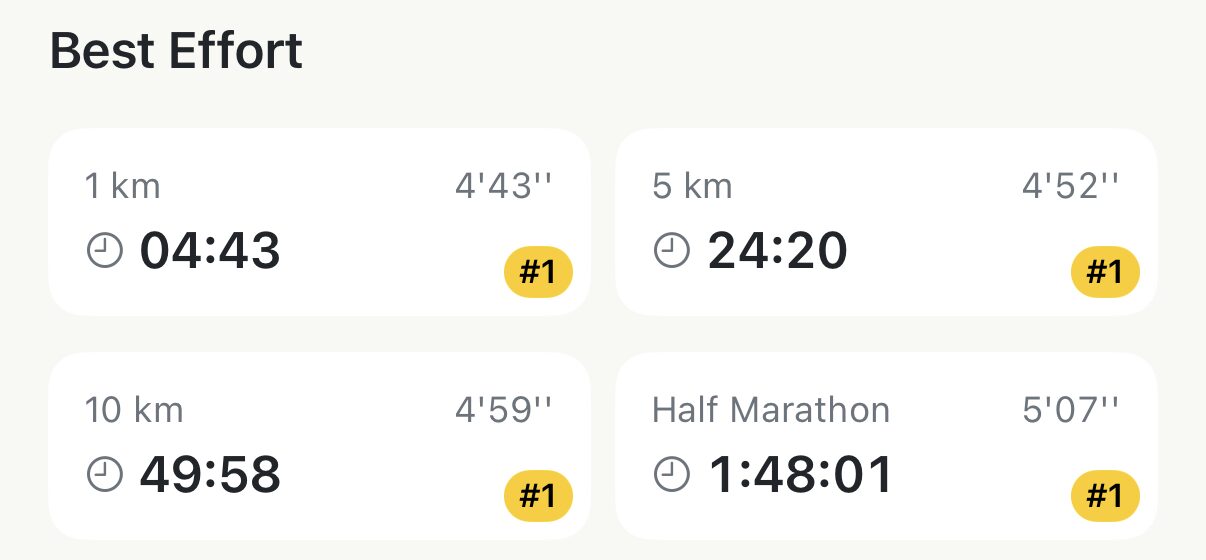
Each card is one distance, its time, and the pace that time works out to:
- In kilometres: 1 km, 5 km, 10 km, Half Marathon, Marathon.
- In miles: 1 mi, 2 mi, 5 km, 10 km, 10 mi, Half Marathon, Marathon — the two race distances everyone shares, plus the mile ones.
A small badge in the corner is the part worth reading. It’s the effort’s rank against every run you’ve ever done at that distance: #1, #2 and #3 in gold, silver and bronze, #4 and #5 outlined, and nothing at all below that. A #2 on the 5 km card means the second-fastest 5 km you have ever run inside any run — not the second-fastest 5K race.
When a run sets a new #1, a medal banner reads New PR across the top of the section the first time you open it. It shows once. After that, the gold badge is the record.
Tap a card to see where it happened#
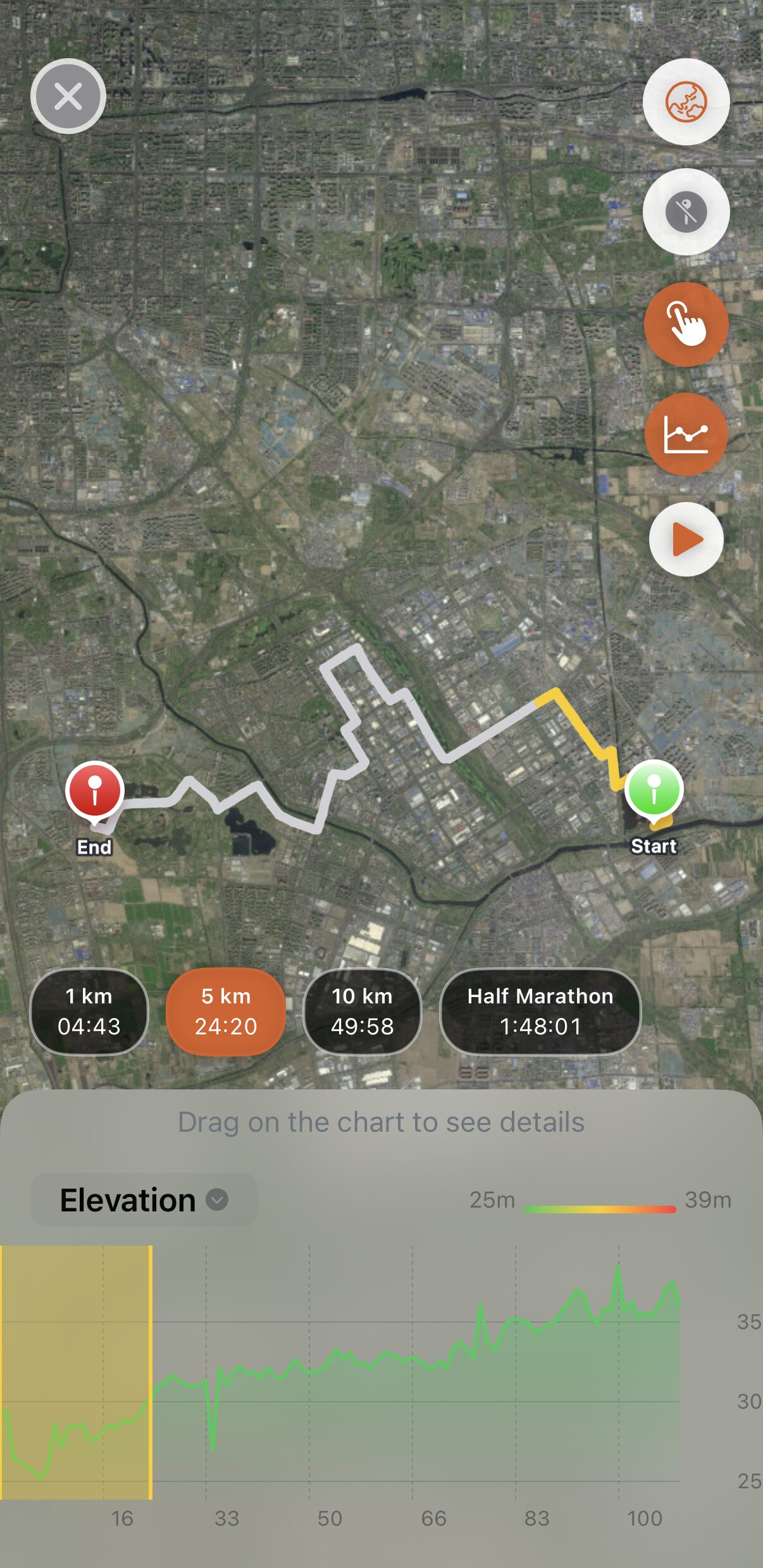
Tapping a card opens the full-screen map with that stretch lit up and the rest of the route greyed out. The chart underneath shades the same window — elevation by default, and the dropdown on it switches to pace or heart rate — so you can see whether the effort was an even push or a downhill gift. The pills along the bottom switch between distances without leaving the map.
The tap is where the number becomes useful. A fast 5 km that turns out to be the first 5 km of a race is a pacing story. The same 5 km at the far end of a long run is a different one.
Best Effort and your records are the same thing#
The Records screen — the Records chip at the top of Run Insights — keeps a top ten for each of the five race distances: 1 km, 5 km, 10 km, half and marathon. Those rows are best efforts. Every run is searched as it comes in, and any stretch fast enough to make a top ten goes on the board.
Two things follow from that:
- You don’t have to race a 5K to set a 5K record. A quick middle of a 12 km run counts, and it counts the same.
- Your history is already scored. Best efforts were found for every run on the day you first synced, so the records screen is complete without you opening a single old run.
The mile cards — 1 mi, 2 mi, 10 mi — show a time but no badge. Apex Run keeps no leaderboard for those yet, so there’s nothing to rank them against.
Worth knowing#
- Paused time doesn’t count. Stop at a light with the watch paused and the effort’s clock stops with it, so a 5 km with a red light in the middle is still one continuous 5 km on the board.
- Ranks are live. The #1 on a run from May turns into #2 the day you beat it, so an old run’s badge tells you where it stands today, not what it was when you ran it.
- It uses the same distance as your splits, so a best effort and the splits it sits across always agree with each other.
- Merged runs and imported .fit files get best efforts too, and they go on the records board like any other run.
- Treadmill runs don’t get a Best Effort section. Best Effort needs a route to show you where the stretch was, and a treadmill run has none.
- It’s free, on every run, however old.
Why it was built this way: The number that made me want to tap
Get the app
Your fastest 5K is probably hiding in a longer run.
Best Effort is free on every run already in Apple Health — and the records it found were set the moment you first synced, long runs included.
↓ Download Apex Run